


Radar, GPS & Speedometer - USA
4.0109.00 Reviews
App Specs
- Version
- 6.6
- Updated On
- License
- Free
- Downloads
- 1,000,000+
- Developer
- Bilge Bulut Mobile
- Categories
- Maps & Navigation
- Platform
- Android, iOS
Screenshots
 Analysis by AppCompare
I judge a driving app less by its first few minutes than by whether I still want it open on an ordinary trip a month later. Radar, GPS & Speedometer makes a quick impression with its mix of navigation, speed information and camera alerts, but its lasting value depends on how well those pieces fit into your routine. I’d treat it as a useful extra on the dashboard, not as a reason to stop paying attention to the road or to replace every navigation tool you already trust.
The first-week appeal: one glance for several kinds of information
The attraction is easy to understand on a new route. Instead of switching between a map and a separate speed display, I can use one app to keep track of where I am and how fast I’m going. For a driver who likes having that context visible, the combination feels practical from the start. The interface is described as straightforward, and the app’s focus on driving information makes its purpose clear without much explanation.
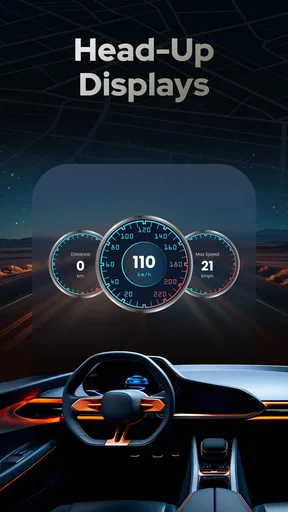
The speed display is the part I’d check first. A phone’s GPS-based speed reading can be a helpful point of reference, especially when the car’s display is hard to read, but I would not treat it as a substitute for the vehicle’s instruments or local road signs. Readings can depend on location and reception, and speed limits can change. My useful habit would be to glance at the app before setting off, then let it support—not dictate—my attention while driving.
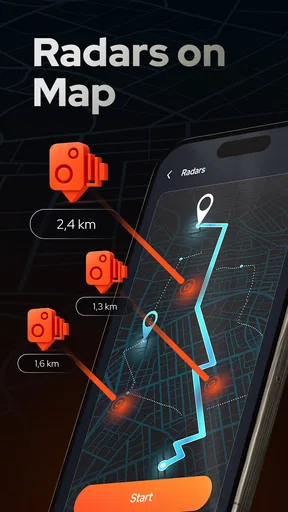
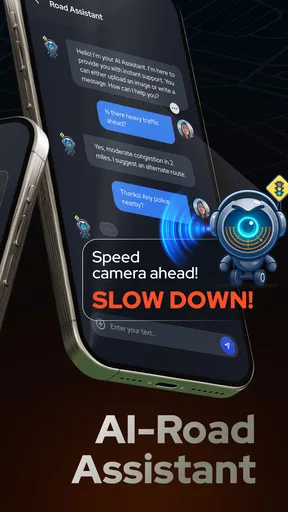
Radar and camera alerts are appealing for a different reason: they can prompt a driver to pay closer attention to speed on a familiar commute or an unfamiliar road. I would still regard an alert as a reminder rather than a guarantee that every camera or restriction is represented. That distinction matters. The feature is most useful when it reinforces careful driving, not when someone assumes it makes speeding safe or removes the need to watch signs.
Everyday use: where the combination makes sense
Imagine driving across town to an appointment, taking a route you don’t know well, and wanting both a position reference and a clear speed readout. This app’s combination can be convenient in that situation: I can get a sense of my progress without opening several separate tools. On a longer drive, the radar and map views may also make it easier to stay aware of the route while keeping speed in mind. The value is less about a dramatic feature and more about reducing small bits of app-switching.
It may suit drivers who often travel between areas, people who want an additional speed readout, and anyone who prefers a dedicated driving display to a general-purpose map’s busy interface. It is less compelling if your car already offers the information you need in a clear display, or if your regular navigation app reliably handles routes and alerts in a way you prefer. In that case, adding another screen could create clutter rather than solve a problem.
There is also a practical difference between a driving companion and a full navigation replacement. A dedicated navigation service may be the better choice when route planning, detailed turn-by-turn guidance, traffic-aware alternatives or a deeply familiar map ecosystem are your priorities. I’d compare the actual screens and alerts on a typical route before relying on this app alone. Keep the phone mounted securely and set things up while parked; no speed or radar feature is worth a glance that takes attention away from the road.
Worth Reading Before You Choose

Flipboard Shows What News Apps Must Do Beyond the Feed

Switching to Android Auto Means Rethinking Your Driving Routine

Google Calendar Makes a Crowded Week Easier to Manage

Ludo King Makes the Most of the Minutes Between Plans

Baby Panda World Brings Quick Play to Modern Phones, but Its Game Library Feels Busy

ESPN’s Live Game View Makes Following Close Games Easier
What determines its value after the novelty fades
I’d judge this app’s lasting value by whether its combined map, speed display and radar alerts make an ordinary drive easier—not simply by how appealing they seem on first launch. That comes down to a repeatable setup: choosing a useful screen, checking it before setting off and keeping alerts from competing with the road. Next, I’d look at which kinds of trips give that habit a real payoff.
Month-to-month usefulness is a matter of habit
In the first week, a combined speedometer and radar view can feel like a fresh upgrade. Later, the question is whether it earns a consistent place in your routine. I would judge that by a few simple things: does it make a route easier to follow, does its display help me check speed without extra fiddling, and do its alerts feel relevant rather than noisy? If the answer is yes on the roads I actually use, opening it before a drive can become a sensible habit.
For occasional trips, I’d be selective. A person who drives the same short route each day may soon stop noticing an extra display, while someone who regularly visits unfamiliar places may get more repeat value from having a map and speed information together. Before a longer journey, I’d check the route and make sure the phone is positioned comfortably. I would not wait until I’m moving to explore settings, change units or work out which information I want on screen.
Maintenance, subscriptions and the cost of keeping it useful
The app is free to install, and its developer is Bilge Bulut Mobile. It has a 4.3 average from around 1.9 thousand ratings, with over 1 million installs. It is rated for everyone and runs on Android 6.0 or later; version 5.1 is the current version. Optional in-app purchases range from $2.99 to $29.99 per item, so I’d look at what each purchase offers and whether I would use it regularly before spending. The free starting point makes it easy to try the basic experience first.
For a tool like this, maintenance is not only about updates or purchases. It is also about keeping the app useful without turning setup into a chore. I’d review the alert choices after a few drives: if a notification is distracting or not relevant to my routes, I’d adjust my use rather than accept every alert by default. The most helpful setup is the one that gives enough information to support attention without asking me to manage the phone while driving.
Where fatigue and friction can creep in
Even a useful driving display can become visual noise if it competes with the road, the car’s own instruments or another navigation app. Radar alerts can also lose their value if I treat them as authoritative instead of as prompts to check the surroundings and posted limits. I’d avoid running several apps that announce similar things at once; overlapping alerts can make a simple trip feel busier, not safer.
Battery use, phone placement and the need to keep a screen visible are practical considerations for any phone-based driving tool. I’d test the setup while parked and on a short familiar trip before depending on it for a long journey. If the phone gets in the way, the display is difficult to read, or the app adds more distraction than reassurance, I would close it and use the car’s built-in information or a simpler navigation option instead.
Who should keep it—and who should move on
I can see this being a worthwhile addition for someone who wants a combined GPS and speed-focused view, drives unfamiliar roads often, or would appreciate an extra reminder to monitor speed. Its strongest case is convenience: several pieces of driving context in one place, with the option to try it without an upfront purchase. The benefit is personal, though; it depends on whether that combined view improves a real part of your driving routine.
I’d skip it if you already have a navigation setup you trust, if extra alerts make you tense or distracted, or if you expect a phone app to replace careful observation and road signs. I would also avoid paying for an add-on just because it appears in the app; first identify a recurring need, then decide whether a purchase addresses it. That small pause is a better test of long-term value than the novelty of a new dashboard screen.
Final thoughts
Have you ever found yourself driving through unfamiliar territory and wishing you had a trusty navigation tool? Well, let me introduce you to Radar, GPS & Speedometer. This app is like your personal co-pilot, keeping you on track and informed about your drive in real-time. I took it for a spin recently, and here's how it went down!
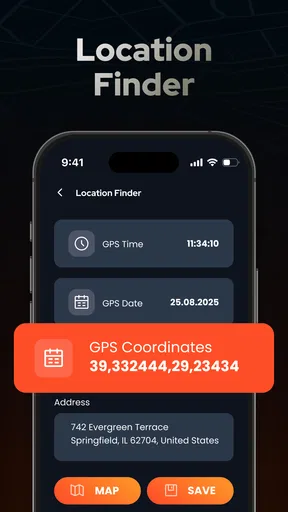
Jumping into the app for the first time, I was greeted with a sleek and intuitive interface. It’s designed to be user-friendly, so even if you’re not particularly tech-savvy, you’ll find your way around pretty quickly. The main screen presents a clear view of your speed and direction, which is great for maintaining awareness without having to glance away from the road too much.
Features That Stand Out
One of the app's most impressive features is its real-time speedometer. It not only displays your current speed but also alerts you if you’re exceeding the speed limit. This feature is a lifesaver for those of us who tend to get a little too heavy-footed on the pedal. Plus, the app can switch between different measurement units, which is handy for travelers hopping between countries.
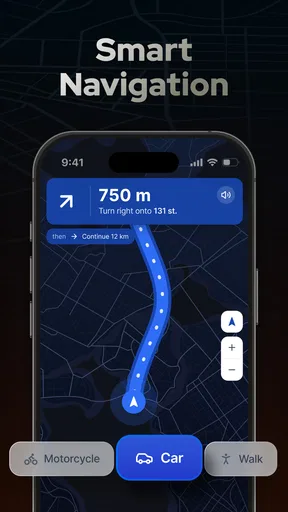
Another highlight is the GPS functionality. Unlike some other apps that can be a bit sluggish, it updates your location swiftly and accurately. It pinpoints your position on the map, ensuring you never feel lost. The radar feature is a neat addition, alerting you to potential speed traps and traffic cameras. This keeps your driving experience smooth and fine-free.
Ease of Use
Now, let's talk about usability. Setting up the app is straightforward. Upon launching, you’re walked through a quick tutorial that explains all the features and settings. What I appreciated was the level of customization available. You can tweak the display settings, choose what alerts you want to receive, and even change the app’s theme to match your car’s interior vibe.
Using the app while driving is simple and distraction-free. The voice alerts are clear, meaning you don’t have to take your eyes off the road to understand the notifications. It's designed to be a helping hand rather than a distraction, which is crucial for safety.
Performance on the Road
During my test drive, the app performed admirably. The speedometer was accurate when cross-referenced with my car's inbuilt system, and the GPS didn’t lag or crash, which is a common issue with some other apps. The radar alerts were timely, giving me enough notice to adjust my speed before approaching a camera or speed trap.
The app also worked seamlessly in areas with poor reception. This is thanks to its ability to download maps for offline use, a feature that really came in handy when I took a detour through a more remote area. It’s comforting to know that the app has your back, even when you’re off the beaten path.
All in all, the app is a solid choice for anyone who spends a significant amount of time on the road. Whether you’re a daily commuter, a frequent traveler, or just someone who likes to take the scenic route, it adds a layer of convenience and safety to your driving experience. Given its range of features and reliable performance, it’s worth trying to see whether it fits your routine.
In my book, this app gets a thumbs up for its practicality and efficiency. It’s like having a little driving buddy who’s always looking out for you. Safe travels!
Pros
- Accurate GPS tracking for navigation.
- Real-time speed monitoring feature.
- User-friendly interface design.
- Customizable alert settings.
- Works offline for remote areas.
Cons
- May drain battery quickly.
- Ads in the free version.
- Limited features without premium.
- Can lag on older devices.
- Requires GPS for full functionality.
FAQs for Radar, GPS & Speedometer - USA
What features does the Radar, GPS & Speedometer app offer?
Radar, GPS & Speedometer provides a comprehensive suite of tools, including real-time GPS navigation, speed tracking, and radar detection. It's designed to enhance your driving experience by offering detailed maps, speed limits, and alerts for speed cameras or traffic disruptions. The app also provides customizable settings to tailor the experience to your needs.
Is the Radar, GPS & Speedometer app compatible with both Android and iOS devices?
Yes, the app is fully compatible with both Android and iOS platforms. It is optimized for a wide range of devices, ensuring smooth performance and reliability. You can download it from the Google Play Store for Android devices or the Apple App Store for iOS devices, making it accessible to most smartphone users.
How accurate is the speedometer feature in this app?
The speedometer feature in Radar, GPS & Speedometer is highly accurate, using advanced GPS technology to provide real-time speed tracking. It updates frequently to ensure precision and reliability, similar to a car's built-in speedometer. However, accuracy may vary slightly based on GPS signal strength and environmental conditions.
Does the app require an internet connection to function?
While an internet connection enhances the app's capabilities, such as downloading maps and real-time traffic updates, the core features like GPS navigation and speed tracking can function offline. Users can download maps for offline use, ensuring that navigation and speed tracking remain available even without a stable internet connection.
Are there any subscription fees or in-app purchases involved?
The app offers a free version with basic features, but there are in-app purchases and subscription options for advanced functionalities. These may include premium map updates, ad-free experience, and enhanced radar detection features. It's advisable to review the pricing and features before committing to a purchase.


